
Under the Hood: How AI OCR Data Extraction in Accounting Replaces Manual Entry

Fintech Analyst | AI OCR, Invoice Data Extraction, AP Automation & Accounting Technology
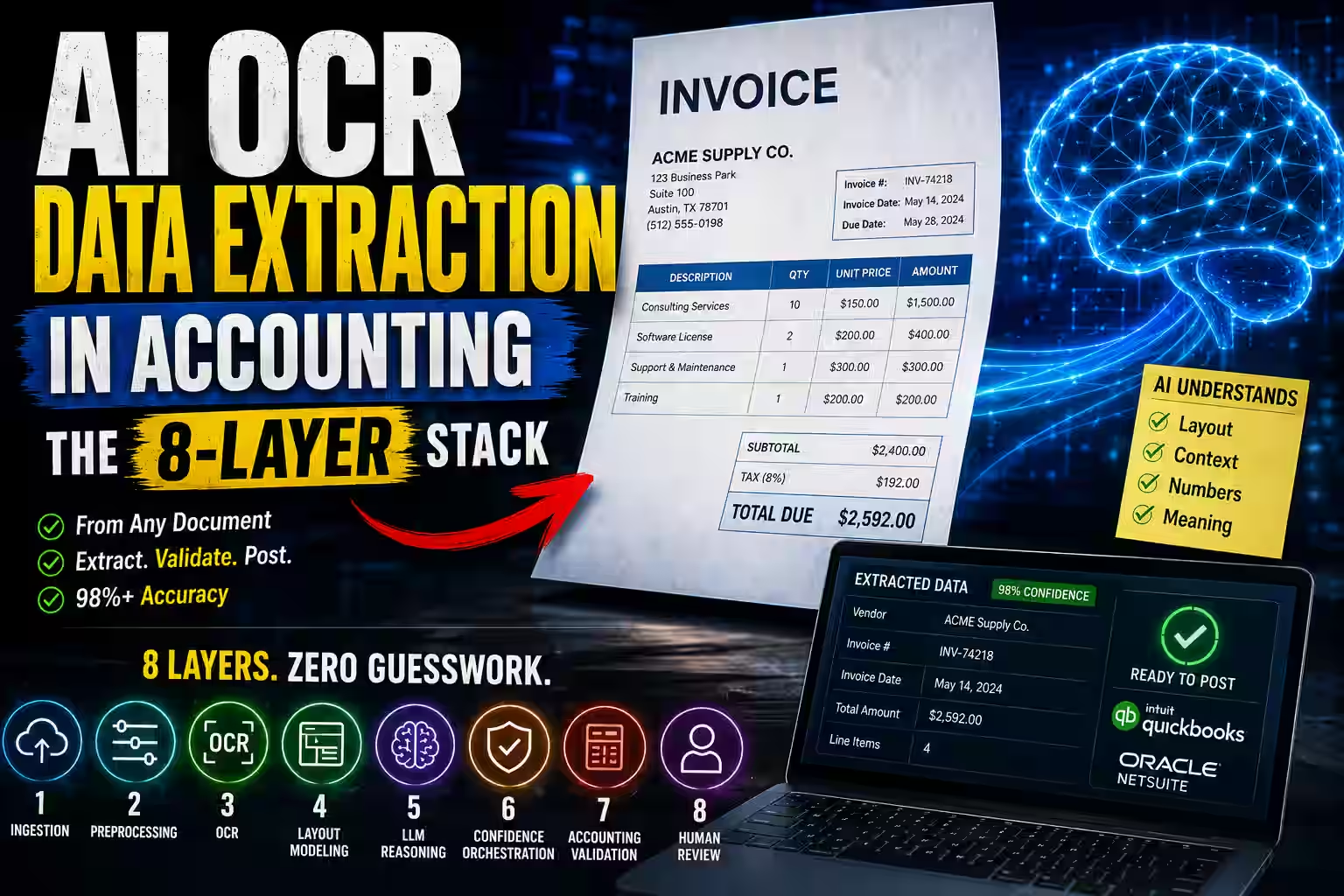
How AI OCR Data Extraction Replaces Manual Entry
Modern accounting automation does not stop at reading text. It combines computer vision, layout-aware models, and large language models to extract, validate, and route financial data with far less manual effort.
From text capture to financial understanding
Traditional OCR converts invoices and receipts into raw characters. AI OCR data extraction in accounting goes further by understanding spatial layout, field relationships, and business meaning.
Computer vision, LayoutLM, and LLMs working together
Computer vision detects structure, layout-aware transformers like LayoutLM interpret positioned text, and LLMs resolve ambiguous fields, messy formatting, and unstructured edge cases.
Extraction, normalization, and accounting validation
The system handles automated invoice data extraction, line-item normalization, vendor matching, GL account mapping, purchase order 3-way matching, and duplicate detection before posting.
Less manual entry. Better control.
Finance teams spend less time re-keying data and more time handling true exceptions. That improves accuracy, speeds close cycles, and strengthens audit readiness without sacrificing control.
Manual entry disappears only when the system can read the document, understand the context, validate the output, and route uncertain cases to a human with clear confidence signals.
Picture the final week of any month in a busy accounts payable team. Someone squints at a three-page invoice, retypes figures into a spreadsheet, and quietly prays they didn’t drop a decimal. Multiply that by a few thousand documents, and you don’t just have a workload problem — you have a slow-motion accuracy problem, where one transposed vendor code or one skipped line item poisons a general ledger account, breaks a three-way match, and resurfaces months later as an audit flag nobody can explain.
Here’s the part that stings: this work costs a fortune precisely because it stays invisible. According to the American Productivity & Quality Center (APQC), the most efficient finance teams process an invoice for around $2.07, while the least efficient spend well over $10 for the exact same task. The gap isn’t talent. It’s automation — specifically, the kind of intelligent document processing that AI OCR data extraction in accounting now makes genuinely reliable.
So let’s go under the hood. Not the marketing version — the real one. Whether you’re a CTO weighing an enterprise rollout, a controller checking whether your close can lean on this, or a developer wiring up a financial pipeline, this walkthrough covers what most vendor pages skip: the model mechanics, the confidence thresholds, the regex safety nets, and the accounting logic that turns extracted text into something your ledger can actually trust.
In Brief: AI OCR Data Extraction in Accounting
- Traditional OCR converts a document image into flat text and stops there.
- AI OCR data extraction in accounting combines OCR, layout-aware models, and LLMs to understand meaning, structure, and spatial context.
- The result is automated invoice data extraction, line-item parsing, validation against your ledger, and accounting-ready output — with far less manual entry.
- Where humans still fit is exception review: the small share of low-confidence fields, failed vendor matches, and flagged duplicates that genuinely need judgment.
- The best platforms — Azure AI Document Intelligence, Google Cloud Document AI, and AWS Textract — pair OCR with document-understanding models trained on millions of financial documents.
What Is AI OCR Data Extraction in Accounting?
AI OCR data extraction in accounting uses machine learning — computer vision, transformer architectures, and large language models working together — to automatically find, extract, and structure data from financial documents like invoices, receipts, purchase orders, and utility bills.
The word “OCR” undersells it a little. Traditional optical character recognition turns a document image into a stream of characters and stops. AI OCR keeps going. It reads meaning. It tells the difference between a grand total anchored at the bottom of the page and a subtotal buried three rows deep in a line item table, and it drops each value into the right field in your downstream system.
That’s the leap worth internalizing. The question is no longer “can it read the text,” but “does it understand what the text is for.”
Platforms like Azure AI Document Intelligence, Google Cloud Document AI, and AWS Textract set the enterprise standard here. Each pairs OCR with document-understanding models trained on millions of financial documents across dozens of languages and layouts — which is exactly why they handle the messy real world better than any rigid template ever could.
If you’re evaluating where document AI fits inside a broader finance stack, see our guide to the best AI accounting software for a wider look at bookkeeping, AP, reconciliation, and close automation.
What Most Articles Miss

Most content about AI OCR in accounting stops at text extraction, but the real value begins after extraction — in normalization, validation, and the model handoff that turns raw text into a posted entry.
Most guides celebrate that the software “reads the invoice” and call that the win. Reading the invoice is the easy half.
The real value begins after extraction — when the system normalizes line items into a consistent schema, matches the vendor to your master file, maps each line to the correct GL account, validates totals through a three-way match, flags duplicates before they post, and routes only the genuinely uncertain fields to a human. That downstream accounting intelligence is what separates true automation from a fancier scanner.
The other thing most articles gloss over is the handoff between the models. Computer vision, LayoutLM, and LLMs each solve a different problem, and knowing where one ends and the next begins is the difference between evaluating a product intelligently and taking a demo at face value. This guide gives that handoff the attention it deserves.
Traditional OCR vs. Intelligent Document Processing: What’s the Real Difference?
Traditional OCR converts a document image into flat text with no understanding of field meaning, while intelligent document processing adds spatial awareness, contextual parsing, and structured output that slots straight into your accounting system.
Think of traditional OCR as a very fast, very literal typist. Tools like Tesseract or older configurations of ABBYY FineReader scan pixel patterns and hand you back a flat block of text. They don’t judge, interpret, or organize. Feed one a dense three-page invoice, and it dutifully returns the characters — leaving a human or a brittle template script to figure out where every value belongs.
Intelligent document processing in accounting closes that gap with three capabilities old OCR simply lacks. First, spatial awareness: it understands that a number sitting beside “Invoice Total” means something entirely different from the same number floating in a paragraph. Second, contextual parsing: it uses language models to resolve ambiguous fields based on what surrounds them. Third, structured output: it hands you clean, schema-ready data (usually JSON) that flows directly into your ERP, AP workflow, or data warehouse.
For buyers comparing tools rather than model architecture, our roundup of AI invoicing software tools explains when invoice capture, AR invoicing, and AP automation belong in different categories.
The shift underneath is bigger than it looks. Template-based OCR assumes your documents all look the same. IDP assumes they never do — and builds its entire approach around that reality. If you’ve ever tried to maintain a template library across a few hundred vendors, you already know which assumption survives contact with real invoices.
Traditional OCR vs. Intelligent Document Processing
Traditional OCR extracts text from documents. Intelligent document processing goes further by understanding structure, context, and downstream accounting use.
| Dimension | Traditional OCR | Intelligent Document Processing |
|---|---|---|
| Core output | Flat text with limited structure | Structured, labeled fields and machine-readable output |
| Understanding | Reads characters only | Understands text, layout, and context |
| Handling new layouts | Relies heavily on rules or templates | Adapts better to document variation |
| Line item extraction | Weak with tables and row relationships | Strong at parsing rows, columns, headers, and totals |
| Confidence signals | Limited field-level visibility | Per-field confidence scoring and review routing |
| Accounting readiness | Needs extra parsing before use | Better suited for ERP workflows, validations, and controls |
| Best fit | Uniform, simple documents | Real-world financial documents with layout variation |
Table of Contents
The 8-Layer AI OCR Accounting Stack
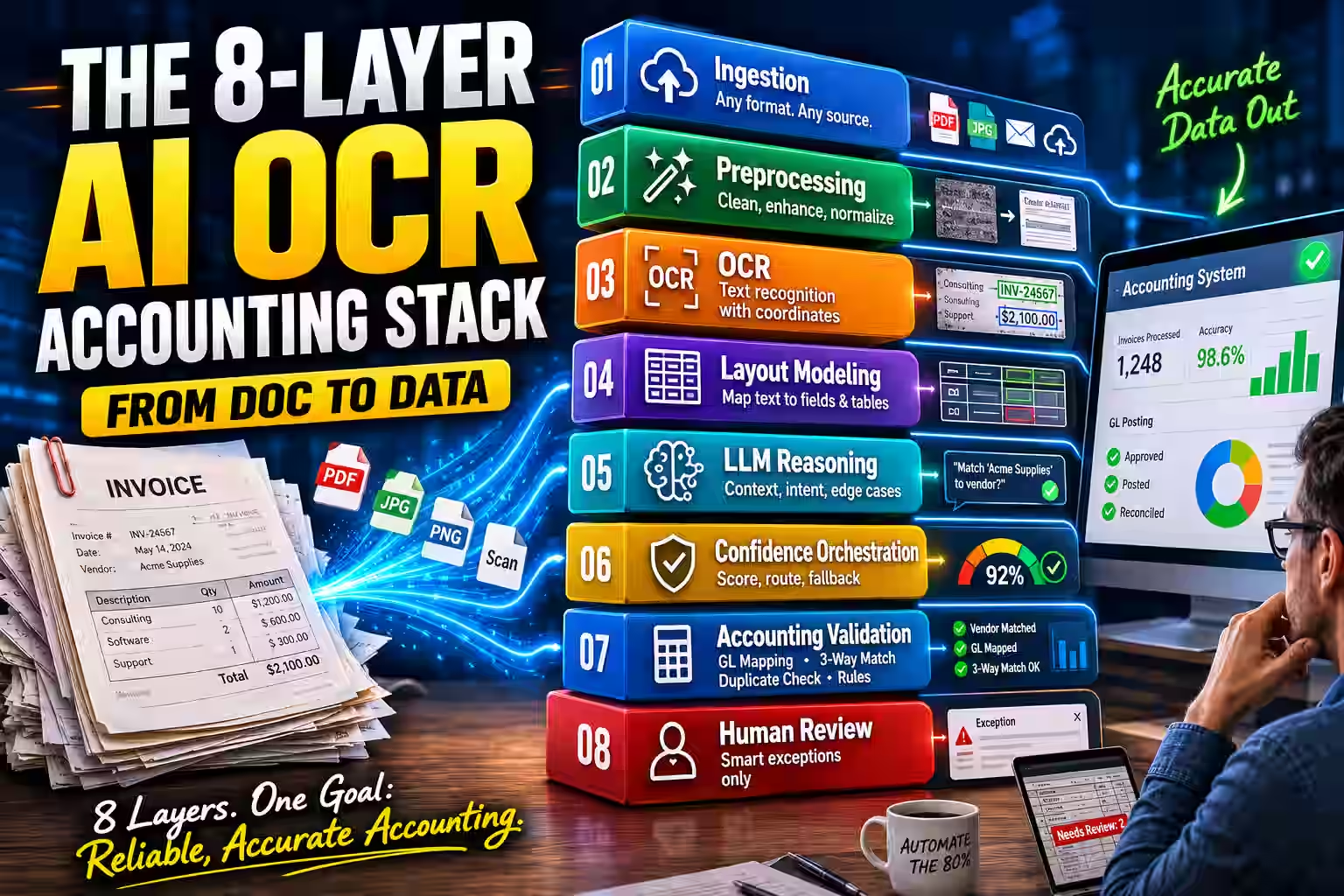
The 8-Layer AI OCR Accounting Stack is a mental model that breaks the extraction pipeline into eight stages — ingestion, preprocessing, OCR, layout modeling, LLM reasoning, confidence orchestration, accounting validation, and human exception review — each catching what the layer before it might miss.
Here’s a framework worth keeping. Every reliable AI OCR data extraction system in accounting moves a document through eight distinct layers, and each one exists to catch what the layer before it might miss. Once you see the layers, the whole system stops feeling like magic and starts feeling like solid engineering.
- Ingestion — accepting the document in whatever shape it arrives.
- Preprocessing — cleaning the image so recognition can trust it.
- OCR — converting pixels into characters with spatial coordinates.
- Layout modeling — mapping positioned text to meaningful fields.
- LLM contextual reasoning — resolving ambiguity and messy edge cases.
- Confidence orchestration — scoring, routing, and regex fallback.
- Accounting validation — vendor matching, GL mapping, 3-way matching, duplicate detection.
- Human exception review — judgment where automation reaches its honest limit.
Let’s walk each layer in turn.
Layers 1 and 2: Unstructured Data Ingestion and Preprocessing
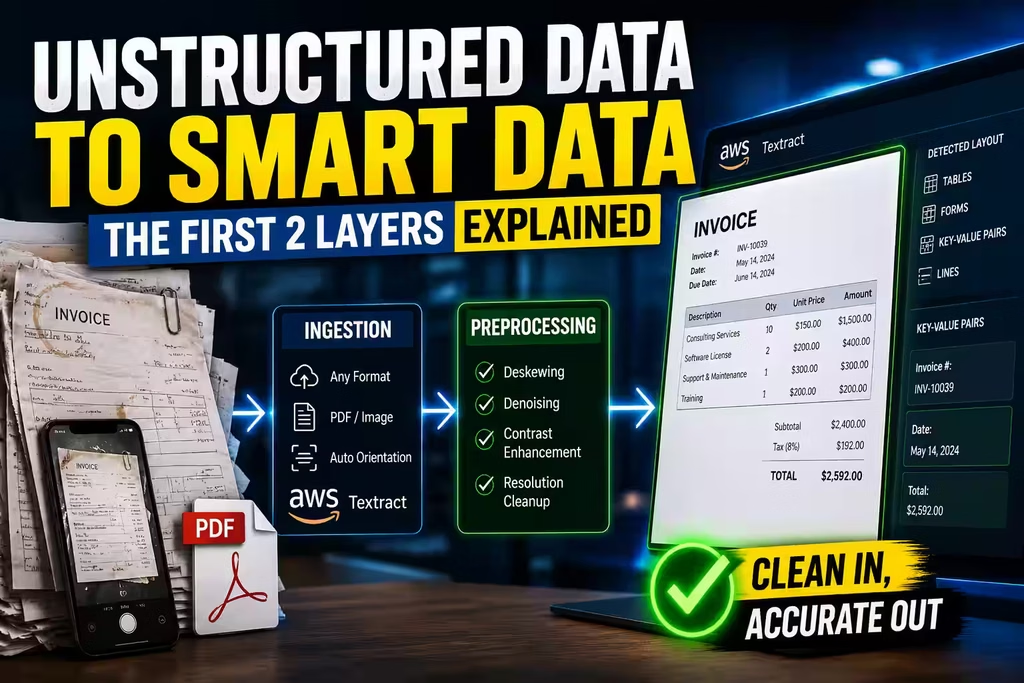
Ingestion accepts documents in any native format, and preprocessing cleans each image so character recognition can read it reliably.
Everything begins with getting the document into the system in whatever shape it arrives — scanned PDF, image file, or digital PDF — and each format needs different care. Scanned documents usually need deskewing, denoising, and resolution cleanup before recognition can trust what it sees. Digital PDFs can skip some of that when a real text layer exists, though encoding quirks and rendering artifacts still sneak in and need fixing.
This unstructured data ingestion stage matters more than it seems. Garbage in, garbage out applies with brutal literalness here: a skewed, low-contrast scan sabotages every layer that follows. AWS Textract handles ingestion across PDF and image formats, automatically detecting and correcting document orientation before its table models ever get involved. Getting this layer right buys you accuracy everywhere downstream, which is why mature teams treat preprocessing as a first-class part of the pipeline rather than a throwaway step.
Layer 3: OCR and Bounding Boxes — How Computer Vision Reads a Financial Document
Computer vision segments the page into regions using bounding boxes, then OCR converts each region into text tagged with its exact position on the page.
The moment a document lands, a computer vision (CV) model carves the page into regions of interest using bounding boxes. A bounding box is simply a rectangle defined by coordinates (x_min, y_min, x_max, y_max) that pins down exactly where a piece of text sits on the page. Every word, number, table cell, and label gets its own box, and those coordinates travel with the text into the next layer.
This spatial indexing is quietly one of the most important steps in the whole process. Consider two numbers on an invoice: $150.00 and $1,500.00. To a plain text reader, they’re just digits. But their positions — one under “Unit Price,” the other under “Line Total” — tell the system what each one actually means. Spatial document awareness is what keeps a unit price from masquerading as a line total, and it’s the reason CV sits so early in the stack. Without accurate boxes, every model downstream inherits a blindfold.
Layer 4: Layout Modeling — What Is LayoutLM and How Does It Enable Spatial Document Awareness?
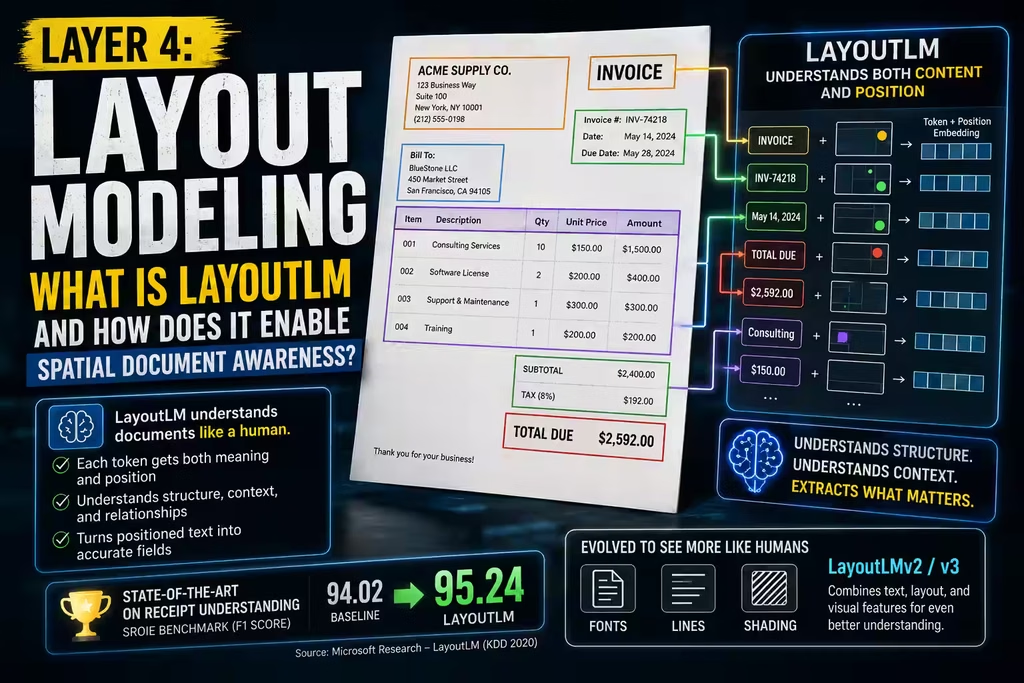
LayoutLM is a transformer model that embeds each token with both its meaning and its position on the page, letting it understand document structure the way a human reader does.
Once the CV layer has tagged text with bounding boxes, the data moves to a transformer built to understand layout. LayoutLM, developed by Microsoft Research and introduced at KDD 2020, is the foundational model here.
What makes LayoutLM special is that it doesn’t read text as a flat sentence. It embeds each token with both its meaning and its spatial coordinates. So it grasps that “TOTAL DUE” tucked in the bottom-right corner plays a different role than “SUBTOTAL” sitting mid-table — even when both have a dollar figure right beside them. That’s the same instinct a human uses when glancing at an invoice, now encoded into a model.
The numbers back it up. According to the Microsoft Research LayoutLM paper, the model reached state-of-the-art results on receipt understanding, pushing F1 scores from 94.02 to 95.24 on the SROIE benchmark. Later versions, LayoutLMv2 and LayoutLMv3, fold in visual features from the document image itself — the fonts, the lines, the shading — narrowing the gap between how a person and a machine “see” a page even further. For most invoice and receipt work, a LayoutLM-family model is the workhorse that turns positioned text into named fields.
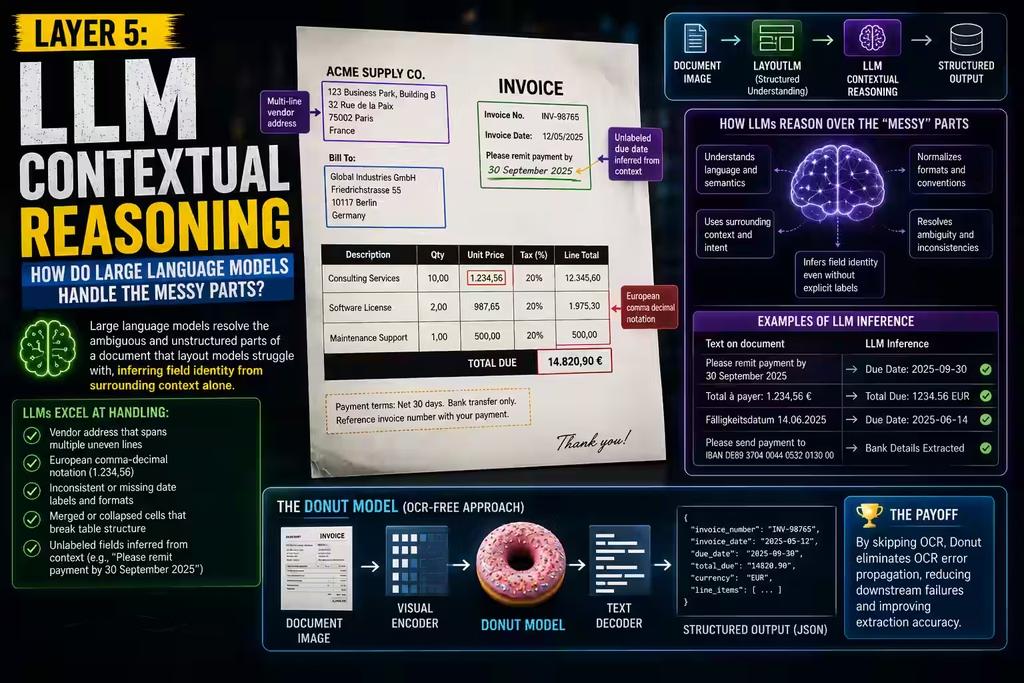
Layer 5: LLM Contextual Reasoning — How Do Large Language Models Handle the Messy Parts?
Large language models resolve the ambiguous and unstructured parts of a document that layout models struggle with, inferring field identity from surrounding context alone.
LayoutLM is excellent at structured fields. But financial documents love to get weird, and that’s where large language models (LLMs) earn their keep. Once LayoutLM surfaces spatially-aware field candidates, the LLM steps in to untangle ambiguity and read the unstructured corners that layout models miss.
A few situations where LLM document processing in finance matters more than you’d expect:
- A vendor address that sprawls across four uneven lines
- European comma-decimal notation that flips how a total reads
- Date formats that shift from vendor to vendor with no warning
- Merged cells in an HTML-rendered invoice that collapse the table structure entirely
An LLM fine-tuned on financial documents can infer a field’s identity from context alone. Show it “Please remit payment by 30 September 2025,” and it recognizes a due date — no “Due Date:” label required. That’s the kind of judgment call that used to demand a human, and it’s the single biggest reason modern extraction feels less brittle than the template era.
Worth knowing: the Donut model (Document Understanding Transformer), published in 2021 by Kim et al. and presented at ECCV 2022, questions whether OCR is even necessary. Donut reads document images end-to-end with a visual encoder and text decoder, skipping character recognition altogether. The payoff is that it sidesteps OCR error propagation — that maddening problem in legacy pipelines where one misread character cascades into a chain of downstream failures. Whether you use a Donut-style OCR-free model or a classic OCR-plus-LayoutLM stack, the point stands: contextual reasoning is what rescues the documents that break rigid systems.
Layer 6: Confidence Orchestration — What Are Confidence Score Thresholds and Regex Fallback Matching?
Confidence orchestration assigns every extracted field a probability score, then routes high-confidence values straight through, sends medium ones to human review, and hands low-confidence ones to regex fallback matching.
Here’s where the system gets honest about its own limits — and honestly, this is the part that should reassure any controller.
Every field the model extracts comes with a confidence score between 0 and 1, essentially the model saying how sure it is. Good enterprise setups use confidence score thresholds to decide what happens next:
- High confidence (say, ≥ 0.92): the value flows straight through, no human needed.
- Medium confidence (roughly 0.70–0.91): the value gets flagged for a human-in-the-loop (HITL) reviewer before it posts.
- Low confidence (below 0.70): the system doesn’t trust its own read and reaches for a backup.
That backup is usually regex fallback matching. When the model can’t lock onto a field, a set of predefined regular expression patterns hunts for it using structure. An invoice number might match INV-\d{6} or [A-Z]{2}\d{8}; a tax ID might fit \d{2}-\d{7}. These patterns quietly recover values the model fumbles, without forcing a human to retype everything from scratch.
Put thresholds and regex together and you get a tiered safety net — one that pushes automation as high as possible while refusing to let a shaky guess slip into your ledger. This is also where you tune the trade-off between straight-through processing and control. Set thresholds too loose and errors sneak in; set them too tight and you drown your reviewers. The sweet spot lives in your own production data, not a vendor’s default.
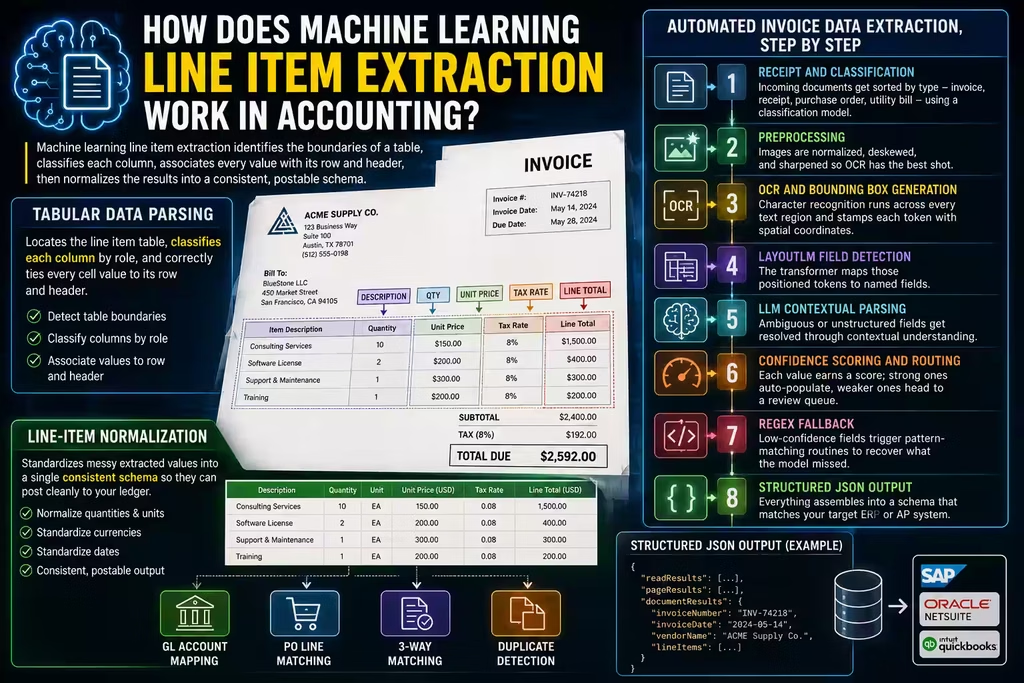
How Does Machine Learning Line Item Extraction Work in Accounting?
Machine learning line item extraction identifies the boundaries of a table, classifies each column, associates every value with its row and header, then normalizes the results into a consistent, postable schema.
If you ask engineers what breaks their invoice pipeline, they’ll almost always point to the same place: line items. Header fields like vendor name, invoice date, and total are usually isolated and clearly labeled. Line items are chaos. They live in tables with unpredictable row counts, merged cells, multi-line descriptions, and column headers that no two vendors seem to agree on. This is exactly the terrain that separates real line item extraction software from a demo that only works on one clean sample.
Tabular Data Parsing
Tabular data parsing locates the line item table, classifies each column by role, and correctly ties every cell value to its row and header.
Once a document reaches the table stage, the model has to answer three questions in order: where does the line item table start and stop, what does each column actually represent (description, quantity, unit price, tax rate, line total), and which value belongs to which row and header. Get one of those wrong and the whole row drifts — a misread column boundary can silently shift a tax rate into the quantity field and blow up the math on every line.
Line-Item Normalization
Line-item normalization standardizes messy extracted values into a single consistent schema so they can post cleanly to your ledger.
Normalization is the unglamorous step that makes the data usable. Quantities written as “2 units,” “2.0,” or “2 ea” all resolve to a clean numeric value with a unit attribute. Prices in mixed currency notations collapse to a single base representation. Dates in a dozen regional formats settle into one standard. This tidy, predictable output is what eventually maps onto your GL account codes and PO line items — the difference between “extracted” and “actually postable.”
Automated Invoice Data Extraction, Step by Step
Automated invoice data extraction moves a document through classification, preprocessing, OCR, layout detection, LLM parsing, confidence routing, regex fallback, and structured output — in that order.
To see how the layers cooperate, here’s the full journey a typical multi-vendor invoice batch takes from arrival to clean data:
- Receipt and classification. Incoming documents get sorted by type — invoice, receipt, purchase order, utility bill — using a classification model. Google Cloud Document AI supports custom classifiers trained on your own document types.
- Preprocessing. Images are normalized, deskewed, and sharpened so OCR has the best possible shot.
- OCR and bounding box generation. Character recognition runs across every text region and stamps each token with spatial coordinates.
- LayoutLM field detection. The transformer maps those positioned tokens to named fields.
- LLM contextual parsing. Ambiguous or unstructured fields get resolved through contextual understanding.
- Confidence scoring and routing. Each value earns a score; strong ones auto-populate, weaker ones head to a review queue.
- Regex fallback. Low-confidence fields trigger pattern-matching routines to recover what the model missed.
- Structured JSON output. Everything assembles into a schema that matches your target ERP or AP system. Azure AI Document Intelligence, for instance, returns JSON with
readResults,pageResults, anddocumentResultsnodes, each holding a different layer of the extraction.
How to Train an AI Model to Read Unstructured Receipt Data

To train an AI model on unstructured receipt data, you gather representative samples, annotate fields, choose a base architecture, evaluate with precision and recall, then calibrate confidence against real production results.
Pre-trained models handle standard invoices beautifully. Receipts are a different animal — faded thermal printing, handwritten totals, oddball layouts from the small vendor down the street. This is where machine learning receipt parsing usually needs a little custom training or fine-tuning to shine.
Here’s the path most teams follow, and it’s more approachable than it sounds.
Start with a representative dataset. Gather real samples of the receipt types you’ll actually see in production, not a curated set of pretty ones. Google Cloud Document AI’s custom extractor can produce meaningful results from as few as 10 documents, though 50–200 labeled examples give you far sturdier accuracy across layout variations. The goal is coverage: every currency, every language, every crumpled corner your team really encounters.
Annotate carefully. Each document needs field-level labeling — bounding boxes drawn around values, tagged with types like merchant name, transaction date, subtotal, tax, and total. Annotation tools come built into platforms like Azure AI Document Intelligence Studio and Google Cloud Document AI Workbench, so you’re not building this from nothing. Consistent labeling matters more than volume here; ten cleanly annotated receipts beat fifty sloppy ones.
Choose your base architecture. For most receipts, LayoutLM-based models bring strong spatial understanding out of the box. For the truly messy ones — thermal prints that have half-faded, or images shot at an angle — an OCR-free approach like Donut can reduce the error propagation that poor character recognition drags in.
Evaluate honestly, then iterate. Test against a held-out set using precision, recall, and F1 per field. When a field shows low recall — meaning the model keeps missing it — that’s your signal to add more annotated examples or adjust the threshold rather than shrug and move on. Track the metrics field by field; a strong average can hide a weak tax field that’s quietly causing all your exceptions.
Calibrate confidence over time. Once you’re live, watch how confidence scores distribute in the real world. If tax amounts on international receipts keep landing below threshold, feed the model more examples of exactly that variation. Training isn’t a one-and-done event; it’s a habit. The best pipelines improve quarter over quarter because the team keeps folding real production edge cases back into the training set.
Layer 7: Accounting Validation — Where the Real Value Lives

Accounting validation is the layer where extracted data proves itself against your books — through vendor master matching, GL account code mapping, purchase order 3-way matching, and duplicate pattern recognition.
Pulling clean data off a document is only half the job. The other half — the half your finance team actually cares about — is making sure that data lands correctly inside your accounting system. This is the layer that turns intelligent document processing accounting from a neat trick into a genuine control.
What Is Vendor Master Matching in Accounts Payable?
Vendor master matching links an extracted vendor name to a verified supplier record in your ERP, using fuzzy string matching and entity disambiguation to reconcile naming variations.
“ACME Corp,” “Acme Corporation,” and “ACME CORP INC” all resolve to the same vendor because the system accounts for abbreviations, punctuation, and those endless legal-entity suffixes. And when a match fails? That’s not a bug; that’s a control. A failed match flags for human review, which is exactly how you stop an invoice from an unknown vendor from quietly auto-posting itself into your books. In fraud terms, that single check is one of your cheapest and most effective defenses.
How Does AI Handle GL Account Code Mapping?
GL account code mapping assigns each extracted line item to the correct account in your chart of accounts by reading the line description and cross-referencing how similar items were coded before.
Say a recurring tech vendor bills you for “Cloud Infrastructure Services – Q3.” The system recognizes the pattern and maps it to your IT expense GL code automatically, drawing on posting history. Anything new or genuinely ambiguous falls back to category-based classification — and, when needed, to a human. It learns your ledger’s habits over time, which is what makes it feel less like software and more like a well-trained junior accountant who already knows how your company codes its spend.
What Is Purchase Order 3-Way Matching, and Can It Be Automated?
Purchase order 3-way matching confirms that the invoice, the purchase order, and the goods receipt all agree on quantity, price, and total — and yes, AI systems automate it fully within configured tolerances.
Automated 3-way matching lines up all three documents and checks the details that matter:
- Invoice quantity against PO quantity against goods-receipt quantity
- Invoice unit price against PO unit price
- Invoice total against PO total, within your configured tolerance
When everything agrees within tolerance, the invoice auto-approves for payment — no human touch required. When something drifts outside tolerance, the system spins up an exception for AP to review. Your team stops rubber-stamping the routine matches and spends its attention only where a real discrepancy lives. That’s the whole promise of automation in one workflow: machines handle the agreement, humans handle the disagreement.
How Does AI Catch Duplicate Invoices?
Duplicate pattern recognition compares each new invoice against your AP history using exact and fuzzy matching, then flags likely duplicates before they post.
Exact matching checks invoice number, vendor ID, total amount, and date. Fuzzy matching catches the sneakier cases — the same invoice number with a prefix stripped off, a slightly different spelling of the vendor, an amount that’s a rounding hair off. So when the system spots the same vendor, same amount, and same rough date under a slightly different invoice number, it flags rather than posts. That single check guards against both the honest accidental resubmission and the deliberate duplicate-invoice fraud that quietly drains AP budgets every year.
Layer 8: Human-in-the-Loop Validation — Where AI Hands Off to People

Human-in-the-loop validation routes only the exceptions — low-confidence fields, failed vendor matches, three-way discrepancies, and duplicate flags — to a person, while everything else posts automatically.
Let’s be straight about something no vendor loves to say out loud: no AI OCR system hits 100% accuracy across every document and every image quality. HITL validation is the honest answer to that reality — the mechanism that bridges what the model is confident about and what your books require.
In a well-designed workflow, people only ever touch the exceptions. Fields below the confidence threshold. Vendor matches that failed. Three-way discrepancies. Duplicate flags. Everything else posts on its own. That flips the old model on its head: instead of humans grinding through every invoice with the software helping now and then, the software handles the volume and humans resolve the tricky few.
The impact is real and easy to feel. A team that once reviewed 500 invoices a day might now look at 40–80 exceptions — roughly the 8–16% of invoices that dip below threshold in typical enterprise deployments. That range shifts with document quality and how varied your vendor mix is, but the direction is always the same: less rote keying, more actual judgment. And because every human correction can feed back into training, your exception rate should shrink over time rather than stay flat.
How Accurate Is AI OCR for Parsing Complex Multi-Page Invoices?

On clean digital PDFs from consistent templates, modern IDP platforms clear 95% field-level accuracy on standard fields, while scanned multi-page invoices with tangled line item tables typically land in the 85–92% range per field.
The honest answer is: it depends — and the things it depends on are worth understanding before you set expectations with your board. On the staples (invoice number, date, total, vendor name), accuracy on clean documents is excellent. Push into scanned, multi-page invoices with complex tables, and per-field accuracy on individual line items settles lower, depending on how gnarly the table is and how good the scan was.
The Donut research paper is encouraging here: OCR-free approaches can match or beat traditional OCR-based pipelines on structured benchmarks while dodging the cascading-error problem that haunts character-recognition-dependent systems.
A few specific things tend to drag multi-page accuracy down, and they’re worth naming so you can plan around them:
- Line item tables that spill across a page break
- Templates that repeat column headers on every page — or don’t
- Pages that mix tabular line items with paragraphs of terms and conditions
- A rotated or landscape page hiding inside an otherwise portrait document
Strong deployments blunt all of these with document-type-specific models, sensible confidence thresholds, and HITL escalation reserved for the genuinely hard documents. The practical takeaway: don’t chase a single headline accuracy number. Measure accuracy per field and per document type on your real documents, because that’s the only figure your close actually feels.
Best AI OCR APIs for Financial Document Automation
The best AI OCR APIs for financial document automation are Azure AI Document Intelligence, Google Cloud Document AI, and AWS Textract — and the right pick depends on your existing cloud stack, language needs, and how much custom training your document mix demands.
Three platforms dominate serious enterprise deployments, and each has a personality worth knowing before you commit.
Azure AI Document Intelligence leans into breadth. Its prebuilt invoice model supports 27 languages and returns structured JSON packed with customer details, vendor info, line items, and key-value pairs. If your world already runs on Azure, it drops in naturally — the prebuilt-invoice model ID works across REST, C#, Python, Java, and JavaScript SDKs, and the integration with Azure Logic Apps and Azure Data Factory makes it a natural fit for enterprise-scale AP automation.
Google Cloud Document AI shines on flexible, low-training-data extraction. It offers specialized parsers for invoices, receipts, and purchase orders, plus a generative-AI custom extractor that can get moving on as few as 10 training documents. It connects directly to BigQuery for downstream analytics, which makes it attractive for finance teams that want to combine extraction with spend analysis. Enterprise Document OCR starts at around $1.50 per 1,000 pages; custom extraction runs at roughly $30 per 1,000 pages.
AWS Textract is the developer’s favorite for flexibility. It pulls text, tables, forms, and key-value pairs, and its Queries feature lets you ask for fields in plain language — no full custom model required. It integrates tightly with Amazon A2I for human review workflows and Amazon Bedrock for LLM-powered enrichment. Paytm reported cost savings of up to 75% after adopting Textract in its document workflows, which gives you a real-world sense of the ceiling when it’s implemented well.
Which one wins for you comes down to a few practical questions. Where does your infrastructure already live? What languages do you need? How does the pricing behave at your real volume? How much custom training will your specific document mix demand? Answer those honestly and the right choice usually reveals itself.
Best AI OCR APIs for Financial Document Automation
Azure AI Document Intelligence, Google Cloud Document AI, and AWS Textract lead most enterprise evaluations. The right fit depends on your cloud stack, language needs, document variability, and how much custom training you expect to need.
Strong fit for organizations already building around the Azure ecosystem.
Well suited for teams that want flexibility with lighter setup requirements.
Strong option for teams that want flexible extraction inside AWS-heavy stacks.
This is usually the first sorting filter. If your data pipelines, storage, and security models are already tied to one cloud, that ecosystem advantage often matters as much as raw extraction quality.
Rich structured JSON output and broad SDK coverage for enterprise use cases.
Strong document specialization and useful downstream analytics alignment.
Lets developers ask for document fields in a more natural way.
Azure tends to win on ecosystem fit and multilingual structured output, Google on flexible extraction and analytics integration, and AWS on developer control plus query-style extraction.
Good option when you need custom handling beyond standard invoice patterns.
Often appealing for teams that want useful results from smaller labeled datasets.
Many teams lean on extraction features and surrounding AWS services together.
If your document mix is highly variable, your evaluation should weigh not just out-of-the-box extraction, but how easily the platform adapts when new vendor layouts and edge cases appear.
Works well for teams building on Azure data and application services.
Pairs naturally with Google Cloud data environments like BigQuery.
Useful when extraction is one step inside a broader serverless or workflow architecture.
Extraction quality matters, but integration quality often decides the long-term winner. The best API is the one that fits cleanly into your downstream review, storage, and posting workflow.
Best value often comes when the rest of your stack already lives in Azure.
Costs and capabilities vary depending on document type and extraction path.
Flexibility is powerful, but full implementations can grow more complex.
No platform wins every use case. The tradeoff is usually between ecosystem alignment, extraction flexibility, pricing clarity, and implementation complexity.
Why This Matters for Finance Teams
Strip away the model names and the architecture diagrams, and here’s what actually changes on the ground: your team stops being a data-entry function and starts being a judgment function.
Manual entry taxes an organization in ways that never show up cleanly on a single line of the P&L. It’s the overtime in the last week of close. It’s the duplicate payment nobody caught until the vendor mentioned it. It’s the audit that takes three weeks instead of three days because the trail back to source documents is a filing cabinet and a prayer. AI OCR data extraction in accounting attacks all of that at once — not by removing people, but by removing the rote work that wastes them.
The strategic payoff compounds. Faster extraction means faster close. Cleaner data means fewer reconciliation cycles. Better audit trails mean shorter audit cycles. Automated 3-way matching means your AP team spends its energy on genuine exceptions rather than rubber-stamping matches that a machine can handle in milliseconds. And every human correction that feeds back into training makes the next month slightly more automated than the last.
For CTOs, the risk argument matters as much as the efficiency one. Manual data entry is a control gap. Every invoice that passes through a human keyboard is a point of potential error or manipulation. A well-configured AI OCR pipeline with HITL exception handling, duplicate detection, and vendor master matching is more auditable, more consistent, and more fraud-resistant than a process that depends on the focus of whoever sits at the keyboard at 5pm on the last day of the month.
Common Implementation Mistakes to Avoid

The technology works. The implementations that fail usually trip on the same avoidable mistakes.
Treating it as a one-and-done deployment. AI OCR systems need ongoing attention. Vendor formats change. New suppliers send documents the model hasn’t seen. Confidence thresholds that worked in month one may be too loose or too tight by month six. The teams that get the most out of these platforms treat them as a continuous improvement program, not a box to check at go-live.
Testing on clean documents, deploying against messy ones. Vendors demo well on pristine PDFs. Your real document mix almost certainly includes thermal-printed receipts, scanned faxes, handwritten fields, and PDFs generated by systems that were last updated when fax machines were considered innovative. Insist on testing against your own document library — not a vendor’s sample set — before you finalize a platform choice.
Setting confidence thresholds by intuition instead of data. The temptation is to set a threshold high enough to feel safe and then forget about it. The right approach is to run a pilot, measure the actual exception rate against your real documents, and tune from there. A threshold that sends 40% of invoices to human review has eliminated roughly half the efficiency gain. A threshold that lets low-confidence values through unchecked is just manual entry with extra steps.
Skipping vendor onboarding guidelines. What arrives in your pipeline determines what your extraction pipeline can do. If you onboard vendors without any guidance on PDF format, font size, or table structure, you’re accepting every possible input variation as your problem to solve. A simple vendor invoice template and a one-page submission guide can meaningfully reduce the tail of difficult documents before they ever reach your system.
Neglecting the feedback loop. Human reviewers correct exceptions. If those corrections don’t feed back into training data, you correct the same mistakes indefinitely. Build the feedback loop from the start — even a lightweight annotation workflow where reviewers tag corrected fields — and your accuracy will improve organically over time.
From Manual Entry to Intelligent Extraction: Your Next Move
Here’s the thing to internalize before you sign anything: moving from manual entry to AI OCR data extraction in accounting is a rollout, not a switch you flip. The teams that reach the highest automation rates — and the smallest exception queues — invest in three areas well beyond picking a platform. They standardize document quality with vendor onboarding guidelines that improve what arrives in the first place. They curate training data that mirrors their real vendor mix, not a tidy ideal. And they treat confidence thresholds as a dial to tune against live results, not a setting to forget.
Step back and the whole architecture makes clean sense. Computer vision assigns spatial context. LayoutLM maps text to fields. LLMs resolve the ambiguity. Confidence thresholds decide what flows through and what pauses. Regex patterns catch the strays. Vendor matching, GL mapping, 3-way matching, and duplicate detection form the accounting brain on top. And HITL validation closes the loop wherever automation reaches its honest limit.
Every layer exists to catch what the one before it might miss. That is not redundancy — it is resilience. And in accounting, resilience is exactly what the balance sheet asks of you.
Frequently Asked Questions
What is the difference between traditional OCR and intelligent document processing for accounting?
Traditional OCR converts a document image into flat text with no understanding of what any field means. Intelligent document processing pairs OCR with transformer models and LLMs to produce structured, labeled data — it understands context, layout, and meaning. IDP hands you clean, ERP-ready output; traditional OCR leaves you to build the interpretation layer yourself.
How does confidence score thresholding work in an AI OCR pipeline?
Every extracted field gets a confidence score from 0 to 1. Fields above a high bar — usually 0.90 to 0.95 — auto-post. Fields in the middle route to a human reviewer. Fields below a low bar trigger regex fallback matching or full re-entry. The thresholds are configurable, and you should calibrate them against your real accuracy for each document type rather than trusting vendor defaults.
What types of financial documents can AI OCR extract data from?
Modern platforms handle invoices, receipts, purchase orders, utility bills, credit notes, remittance advices, and expense reports. Azure AI Document Intelligence’s prebuilt invoice model covers invoices, utility bills, sales orders, and purchase orders across 27 languages. Custom models can be trained for document types specific to your business or industry.
How many training documents do I need to build a custom AI OCR model?
Google Cloud Document AI’s generative custom extractor can deliver meaningful results from as few as 10 labeled documents. For more variable or complex document types, 50 to 200 annotated examples typically produce robust, production-ready accuracy. Plan to retrain periodically as new formats enter your pipeline — it is an ongoing relationship, not a one-time build.
What is purchase order 3-way matching, and can it be fully automated?
Three-way matching confirms that an invoice agrees with both its originating purchase order and its goods receipt, comparing quantities, unit prices, and totals across all three. AI-powered AP systems automate this by extracting structured line items and checking them against PO and GR records in the ERP. Matches within tolerance auto-approve; anything outside tolerance routes to a human for resolution.
How does AI detect duplicate invoices, and why does it matter?
AI duplicate detection compares each new invoice against your AP history using exact matching on invoice number, vendor ID, amount, and date, plus fuzzy matching for near-misses like altered invoice numbers or slight vendor name variations. It flags likely duplicates before they post. Duplicate invoice fraud and accidental resubmission are both common causes of AP overpayment, making this one of the most valuable controls the system provides.
Which AI OCR API is best for financial document automation — Azure, Google, or AWS?
It depends on your stack and your needs. Azure AI Document Intelligence is strong on multi-language invoices and Azure-native integration. Google Cloud Document AI leads on flexible custom extraction with minimal training data. AWS Textract offers query-based extraction and proven cost savings at high volume. Weigh each against your document volume, language requirements, and ERP integration architecture before you commit.
How accurate is AI OCR for parsing complex multi-page invoices?
On clean digital PDFs, modern platforms achieve above 95% field-level accuracy on standard fields like invoice number, date, total, and vendor name. On scanned, multi-page invoices with complex line item tables, per-field accuracy on individual line items typically falls in the 85 to 92% range. Accuracy varies with document quality, table complexity, and the specific model architecture you deploy. Always benchmark on your own real documents rather than relying on vendor headline numbers.
Editorial Integrity
Sources & Citations
Official AI OCR and intelligent document processing documentation, cloud platform product pages, benchmark research, and primary technical sources relevant to accounting automation, invoice extraction, layout-aware document models, and financial validation workflows
This article draws on primary vendor documentation, official cloud platform product pages, research papers, and benchmarking sources to support claims about AI OCR pipelines, layout-aware extraction, confidence thresholds, line-item parsing, accounting validation, and financial document automation.
View full sources, methodology, and editorial notes ⌄
This article was developed using source material directly related to AI OCR data extraction in accounting, intelligent document processing, invoice and receipt parsing, and financial workflow automation. Preference is given to primary sources such as official product documentation, cloud platform materials, technical research papers, benchmark studies, and standards-oriented references where those sources directly support claims about extraction accuracy, layout awareness, confidence scoring, structured output, vendor matching, and workflow automation. Because model capabilities, pricing, published benchmarks, and product features can change over time, readers should verify current details with the vendor or relevant source before making implementation or purchasing decisions.
- Finance operations benchmarking: APQC — cited for invoice processing cost benchmarking and the efficiency gap between lower-maturity and more automated finance operations.
- Official Azure invoice extraction documentation: Azure AI Document Intelligence — Prebuilt Invoice Model — cited for invoice-field extraction capabilities, structured JSON output, and enterprise financial document automation use cases.
- Official Google Cloud Document AI documentation: Google Cloud Document AI — cited for document classification, custom extraction workflows, and financial document processing capabilities.
- Official AWS Textract documentation: AWS Textract — cited for OCR ingestion, table extraction, key-value pair extraction, and financial document workflow support.
- Layout-aware document model research: Microsoft Research — LayoutLM — cited for spatially aware document understanding, token-plus-position modeling, and benchmark improvements in document extraction.
- OCR-free document understanding research: Donut: Document Understanding Transformer — cited for OCR-free document parsing and the reduction of OCR error propagation in document understanding pipelines.
- Enterprise AP and IDP context: Automation Anywhere — Intelligent Document Processing — cited for broader intelligent document processing context, including machine learning, computer vision, and business workflow automation.
Our Editorial Standards
Tech Capital Hub applies Google’s E-E-A-T framework to every AI OCR and accounting automation guide, prioritizing first-party cloud-platform documentation, official product pages, technical research papers, benchmark studies, and workflow-specific source material over promotional claims, generic summaries, or unsupported automation promises.
View how our editorial standards apply to this article ⌄
Grounded in How Finance Teams Actually Process Documents
This guide is structured around what really happens inside accounting and AP workflows: receiving invoices in inconsistent formats, extracting header fields and line items, validating totals, checking vendor records, handling three-way matching, routing low-confidence fields for review, and deciding where human oversight still belongs. We focus on practical implementation realities, not just top-level automation claims.
Model Mechanics, Workflow Layers, and Accounting Logic
Coverage explains the distinctions that matter in practice: the difference between traditional OCR and intelligent document processing, how layout-aware models differ from flat-text extraction, where LLM reasoning improves document understanding, how confidence thresholds affect exception rates, and why downstream controls like vendor matching, GL mapping, and duplicate detection matter more than extraction alone.
Primary Technical Sources, Platform Documentation, and Benchmark Research
Claims are anchored to primary materials wherever possible: official Azure AI Document Intelligence, Google Cloud Document AI, and AWS Textract documentation; Microsoft Research publications such as LayoutLM; OCR-free document understanding research like Donut; and finance benchmarking sources used to frame operational value. We give greater weight to firsthand technical and operational documentation than to broad marketing claims about accuracy or ROI.
Transparent Tradeoffs, Clear Limitations, and Buyer-Safety First
We state limitations plainly: clean digital PDFs behave differently from scanned multi-page invoices, line-item extraction is harder than header extraction, vendor-specific document variation affects results, and published benchmarks do not replace testing on your own document set. Because features, pricing, and performance claims evolve over time, this article is reviewed and updated as stronger source material becomes available. Nothing here is legal, tax, accounting, or financial advice. Corrections or source challenges can be submitted to our editorial team at editorial@techcapitalhub.com.
About the Author
Marcus Delray
Fintech Analyst | AI OCR, Document AI, AP Automation & Accounting Technology
Marcus Delray writes about AI OCR data extraction, intelligent document processing, and accounting automation for finance teams, operators, and technology buyers who need to reduce manual entry, improve financial controls, and understand how document AI actually performs in production workflows. He focuses on what matters operationally: extraction accuracy, line-item handling, confidence thresholds, exception routing, ERP readiness, and where human review still belongs.
View full author bio, credentials, and links ⌄
Marcus Delray is a fintech analyst and founder of Tech Capital Hub, where he covers AI OCR, intelligent document processing, AP automation, finance software, and the systems reshaping accounting operations. He evaluates document automation technology based on how it performs in real financial workflows — how accurately invoices and receipts are parsed, how well line items are extracted across inconsistent layouts, how confidence scoring affects exception queues, how cleanly structured output flows into ERP and AP systems, and how downstream controls like vendor matching, GL mapping, duplicate detection, and three-way matching hold up under live operating conditions.
In accounting automation coverage, he focuses on the distinctions buyers actually need to understand: when traditional OCR is not enough, where layout-aware models add value, how LLM reasoning helps with messy unstructured documents, why line-item extraction is usually harder than header extraction, and how exception handling determines whether a deployment feels like real automation or just a faster review workflow. He explains not just what a platform claims to do, but where it fits operationally and what tradeoffs teams should expect during implementation.
Rather than repeating vendor marketing, he grounds coverage in source-backed analysis using official product documentation, technical papers, benchmark research, integration references, and standards-oriented materials so readers can better understand the performance realities, implementation constraints, and buyer tradeoffs behind each platform.
- Explains how AI OCR, layout-aware extraction, LLM reasoning, and accounting validation layers work together in real document processing pipelines
- Breaks down practical differences between traditional OCR, intelligent document processing, and end-to-end accounting automation
- Evaluates platforms based on line-item extraction quality, structured output, ERP fit, exception handling, and finance workflow readiness
- Grounds analysis in primary sources including vendor documentation, technical research, benchmark studies, integration references, and standards-related materials
Enjoying our content?
Click below to add us as a preferred source. Google will prioritize our latest articles in your Top Stories, AI Mode, and AI Overviews.
Preferred Source on Google


3 thoughts on “Under the Hood: How AI OCR Data Extraction in Accounting Replaces Manual Entry”