
QuickBooks Payroll Review (2026): Pricing, Features, and Is It Worth It?

Fintech Analyst · Founder of Tech Capital Hub
Marcus has spent more than a decade researching financial technology and business accounting tools. In this QuickBooks Payroll review, he breaks down pricing, features, tax filing support, payroll setup, and how QuickBooks compares with Gusto and ADP. The goal is simple: help small business owners decide if QuickBooks Payroll is worth the cost without wading through marketing fluff.
Running a business is the dream. Running payroll is usually the part that wakes you up at 3 AM. Tax deadlines, overtime math, and the low hum of anxiety about the IRS — if any of that sounds familiar, you’re in the right place.
Quick answer: Yes, QuickBooks Payroll is worth it — but mostly if you’re already on QuickBooks Online. The automatic sync between your books and your payroll saves real hours every month. If your team is larger than 10 people, though, the per-employee fees start to sting compared to budget competitors.
This QuickBooks payroll review digs into the pricing, the features, and where it falls short, so you don’t have to find out the hard way. If you’re still deciding whether QuickBooks is the right accounting platform at all, our QuickBooks vs FreshBooks comparison will help you settle that first — payroll only matters once you’ve picked your accounting foundation.
Quick Verdict
Is QuickBooks Payroll Worth It?
QuickBooks Payroll is worth it for businesses already using QuickBooks Online. The built-in sync saves time. The downside is cost, especially as your team grows.
Choose QuickBooks Payroll if:
You already run QuickBooks Online and want one dashboard for books and payroll, plus fast, same-day direct deposits.
Avoid it if:
You employ an international team or need to keep software costs as low as possible.
| Plan | Base Price | Per Employee | Best For |
|---|---|---|---|
| Core | ~$45/mo | ~$6/mo | Small teams needing basic payroll and tax filing |
| Premium | ~$80/mo | ~$8/mo | Growing teams that want time tracking and HR support |
| Elite | ~$125/mo | ~$10/mo | Owners who want tax penalty protection and 24/7 support |
Table of Contents
What Is QuickBooks Payroll?
QuickBooks Payroll is Intuit’s cloud payroll platform, built to plug directly into QuickBooks Online. It handles employee pay, tax filings, and a handful of HR tasks — all from the same login you use for your books.
The logic behind it is simple. If you’re already doing your bookkeeping in QuickBooks, why log into a second system just to pay your team? That’s the pitch, and for a specific type of business, it holds up.
Who actually benefits from this setup?
- Small business owners who want finances and payroll under one roof, not scattered across two logins.
- Accountants who need one streamlined workflow across multiple clients.
- Startups that want payroll software that can grow with them without a painful switch later.
If you haven’t decided between the cloud and desktop version yet, our QuickBooks Online vs Desktop comparison walks through exactly what changes in 2026 as Desktop support winds down.
Important 2026 Update: QuickBooks Desktop Phase-Out
Intuit has ended support and security updates for QuickBooks Desktop 2021 and earlier. If you’re being pushed to migrate to QuickBooks Online this year, bundling in QuickBooks Online Payroll is the path of least resistance — no clunky API bridges required.
How We Evaluated QuickBooks Payroll
Before handing out a rating, we wanted our process to be transparent rather than just another opinion piece. Our evaluation was based on four things: published pricing from Intuit’s official pricing page, a hands-on walkthrough of account setup and a mock payroll run, feature comparisons against Gusto and ADP using their own published plan details, and publicly reported user feedback on support wait times. Where pricing or features may have shifted since publication, we’ve noted that below — always confirm current numbers directly with Intuit before signing up.

QuickBooks Payroll Features and Pricing (2026)
QuickBooks payroll features break down into two tiers: core payroll functions available on every plan, and advanced protections reserved for Premium and Elite. Here’s what you’re actually paying for.
Core Features
HR support tools. Even entry-level plans include basic HR documents. Move up a tier, and you get access to an actual HR advisor — useful if you don’t have anyone in-house handling that.
Automated payroll processing. Set it up once, and if employee pay doesn’t change month to month, the system runs on its own — math, deductions, and deposits included.
Direct deposit, with a same-day option. Most competitors make you wait 2–4 days for funds to move. QuickBooks lets you hold onto cash longer, which matters when you’re managing tight cash flow.
Tax calculations and filings. Federal and state taxes get calculated and filed automatically, including W-2s and 1099s if you work with contractors.
Time tracking. Hourly employees clock in through an app, and those hours flow straight into payroll — no manual entry, no transcription errors.

Advanced Features (Premium and Elite)
- Tax penalty protection. If Intuit makes a filing error that triggers an IRS penalty, they cover it. On Elite, that protection extends to your own mistakes too, up to $25,000. For anyone nervous about payroll tax compliance, that’s meaningful peace of mind.
- 24/7 support. Available on higher tiers, this matters most if your business doesn’t run on a standard 9-to-5 schedule.
QuickBooks Payroll Pricing Breakdown
How much does QuickBooks payroll cost per month? It depends on your plan and headcount — expect anywhere from roughly $51/month for one employee on Core, up to well over $200/month once you factor in Elite pricing for a mid-sized team.
Core Plan — Base ~$45/month, plus ~$6/employee. Best for small teams that just need automated payroll and tax filing, with next-day (not same-day) direct deposit.
Premium Plan — Base ~$80/month, plus ~$8/employee. The most popular tier, adding time tracking, same-day direct deposit, and access to the HR support center.
Elite Plan — Base ~$125/month, plus ~$10/employee. Built for owners who lose sleep over tax mistakes — this tier covers your errors too, and adds 24/7 support plus a personal HR advisor.
Hidden costs to watch for:
- Multistate filing can push your bill up if you employ people across several states.
- 401(k) integration works through Guideline, but plan fees are billed separately.
- Workers’ comp runs through AP Intego — again, premiums are extra.
- QuickBooks Online subscription is usually required on top of your payroll fee, not instead of it.
Pricing Breakdown
QuickBooks Payroll Pricing Breakdown
QuickBooks Payroll pricing depends on the plan you choose and how many employees you pay each month. Core works for small teams. Premium adds time tracking and same-day direct deposit. Elite adds stronger tax protection and 24/7 support.
+ ~$6 per employee
Best for small teams that need basic payroll and tax filing.
+ ~$8 per employee
Best for growing teams that want time tracking and HR support.
+ ~$10 per employee
Best for owners who want tax penalty protection and 24/7 support.
| Plan | Base Price | Per Employee | Direct Deposit | Tax Protection |
|---|---|---|---|---|
| Core | $45/mo | $6/mo | Next-Day | Covers Intuit’s errors only |
| Premium | $80/mo | $8/mo | Same-Day | Covers Intuit’s errors only |
| Elite | $125/mo | $10/mo | Same-Day | Covers your errors too |
- Is QuickBooks payroll worth it at these prices? Run the numbers: five employees on Premium puts you at roughly $120/month just for payroll — a real premium compared to budget alternatives.
Pros and Cons
QuickBooks Payroll’s biggest strength is integration; its biggest weakness is cost as you scale. Here’s the fuller picture.
Pros
- Seamless integration with QuickBooks Online. No CSV exports, no account mapping — your books and your payroll talk to each other instantly.
- Strong brand trust. Intuit isn’t going anywhere, and the infrastructure behind it handles payroll tax compliance across all 50 states without drama.
- Reliable automated tax filing, covering quarterly and annual forms without you touching a form.
- Same-day direct deposit on higher plans, which gives you genuine cash flow flexibility.
Cons
- Costs climb fast with headcount. Per-employee fees can get heavy once you cross 20 employees, especially if you don’t need Elite-level features.
- Support quality is inconsistent unless you’re paying for Elite. Long wait times are a recurring complaint.
- Add-on fees add up. Base software, plus payroll, plus multistate filing — the total can surprise you if you haven’t budgeted for it.
- Weak international support. If you’re hiring contractors abroad, other platforms handle global payments more cheaply and easily.
Ease of Use: Setting Up and Running Payroll
Setup takes about 15 minutes, and running a cycle takes about five. A setup wizard walks you through company info, bank linking, and adding employees, with import tools if you’re migrating from another provider.
The dashboard itself is clean. It flags exactly when payroll is due, shows your total cash requirement up front so you don’t overdraft, and puts a “Run Payroll” button front and center — you genuinely can’t miss it.
Running payroll manually looks like this:
- Click Run Payroll.
- Enter or review imported hours.
- Check the preview — gross pay, taxes, net pay.
- Click Submit.
Even if you’ve never handled employee payroll management before, you can figure this out without opening a manual. Support is the one soft spot: in-product help articles are solid and the chatbot is fine, but getting a human on the phone on the Core plan can mean a long wait.
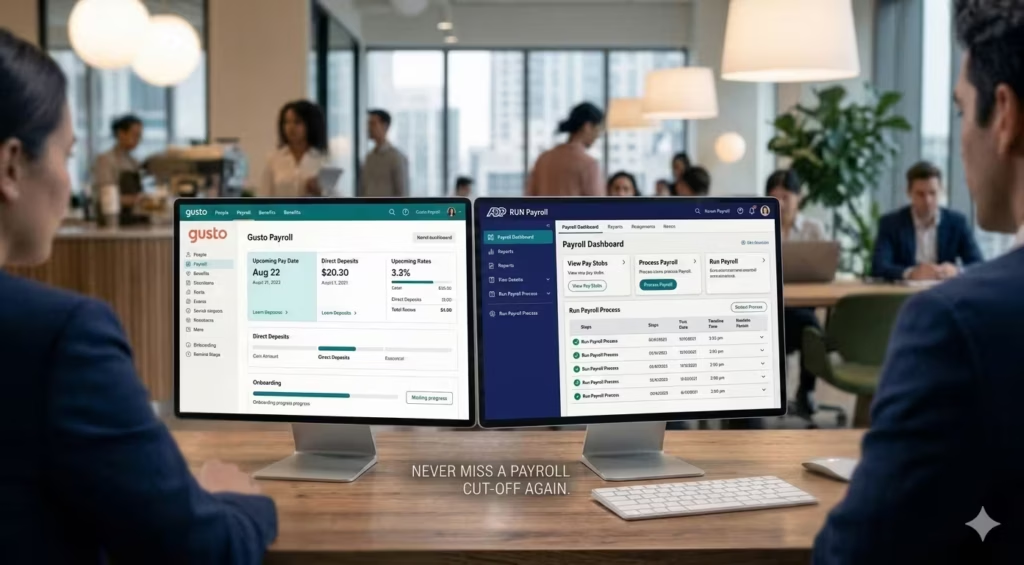
QuickBooks Payroll vs. Gusto vs. ADP
You can’t judge whether something’s worth it in isolation. Here’s how QuickBooks Payroll stacks up against the two names you’ll hear most often.
Gusto* is the friendlier, often cheaper option for small teams, with genuinely excellent support for international contractors — but its QuickBooks integration, while good, isn’t native. If you don’t already use QuickBooks for accounting, Gusto is the easier recommendation. If you do, it’s a closer call: Gusto feels more approachable, QuickBooks feels more accounting-focused.
ADP scales to thousands of employees and handles complex benefits well, but the interface is clunky and pricing is opaque. It’s the right call only if you’re planning to grow into a mid-sized enterprise fast.
FreshBooks is a strong fit for freelancers and very small service businesses, but it isn’t built to be a full payroll powerhouse the way Intuit’s product is.
Comparison Table
QuickBooks Payroll vs. Gusto vs. ADP
If you are comparing payroll software, these three names come up often. QuickBooks Payroll stands out for native QuickBooks Online integration. Gusto feels easier for smaller teams. ADP fits larger and more complex businesses.
| Feature | QuickBooks Payroll | Gusto | ADP Run |
|---|---|---|---|
| Native QBO Integration | Excellent | Good | Fair |
| Ease of Use | Very Good | Excellent | Fair |
| Pricing Transparency | Fair | Excellent | Poor |
| Tax Penalty Protection | Yes (Elite only) | No | Yes (some plans) |
| Same-Day Pay | Yes | Yes (via Wallet) | No |
QuickBooks Payroll
Best for: Businesses already using QuickBooks Online.
Main strength: Native accounting and payroll integration.
Main drawback: Pricing can climb as your team grows.
Gusto
Best for: Small teams that want ease of use and a friendlier setup.
Main strength: Better pricing transparency and user experience.
Main drawback: QuickBooks integration is good, but not native.
ADP Run
Best for: Businesses expecting more scale and complexity.
Main strength: Handles larger teams and advanced needs well.
Main drawback: Interface and pricing are less friendly.
Decision Matrix
Which Payroll Plan Fits Your Business?
The right payroll plan depends on your team size, workflow, and budget. Some businesses need simple payroll. Others need HR tools, stronger support, or better fit for client work. Use the options below to see which plan makes the most sense.
| Business Type | Recommended Plan | Verdict |
|---|---|---|
| Startup (1–5 employees) on QuickBooks Online | Core | Worth it — the time saved on data entry outweighs the cost. |
| Growing team (5–20 employees) | Premium | Maybe — compare against Gusto if HR features matter most to you. |
| Accounting firm managing clients | Premium or Elite | Absolutely — one dashboard across all clients is a real efficiency gain. |
| Freelancer or solo operator | Not recommended | Overkill — a simpler invoicing tool will likely serve you better. |
| Business with international contractors | Not recommended | Look elsewhere — QuickBooks is built for a US-centric team. |
Startup (1–5 employees)
Recommended plan: Core
Why it fits: You get the main payroll features without paying for extras you probably do not need yet.
Best case: You already use QuickBooks Online and want payroll and books in one place.
Growing Team (5–20 employees)
Recommended plan: Premium
Why it fits: This tier adds time tracking, same-day direct deposit, and useful HR support.
Best case: You need more than basic payroll but still want an easy workflow.
Accounting Firm Managing Clients
Recommended plan: Premium or Elite
Why it fits: Managing multiple payroll workflows from one dashboard can save real time.
Best case: You want smoother client operations and fewer manual payroll tasks.
Freelancer or Solo Operator
Recommended plan: Not recommended
Why it does not fit: The platform is more than most solo users need.
Best alternative thinking: A simpler invoicing or contractor-focused tool may be enough.
Business With International Contractors
Recommended plan: Not recommended
Why it does not fit: QuickBooks Payroll is mainly built around US payroll and tax workflows.
Best alternative thinking: Look for a payroll platform with stronger global support.
Is QuickBooks Payroll Worth the Cost?
If you’re an existing QuickBooks Online user with 1–50 employees, Premium is the clear pick. And if you’re still setting up your QuickBooks account before adding payroll, our QuickBooks setup guide for small business covers the exact configuration steps.
Value is subjective, so here’s the breakdown by who you actually are:
Startups (1–5 employees): If you’re already on QuickBooks Online, yes. One login for everything outweighs the slightly higher cost, and Core is enough at this stage.
Growing teams (5–20 employees): Maybe. Weigh QuickBooks’s pricing against Gusto, especially if HR features on Premium or Elite matter to you. Per-employee costs start to hurt here, but same-day direct deposit might be the feature that keeps you anyway.
Accountants: Absolutely. Managing every client from one dashboard is a genuine efficiency win for a bookkeeping practice.
Freelancers: Probably not. If it’s just you, this is more machinery than you need — a cheaper, simpler tool will likely cover it.
Who Should Avoid QuickBooks Payroll?
Is QuickBooks Payroll good for small business?
Generally, yes. It offers a reliable engine for automated payroll processing and tax filing, particularly if you’re already using QuickBooks Online for your books.
Does QuickBooks Payroll have hidden fees?
The main ones come from multistate filing charges and separate 401(k) administration fees. Read the add-on pricing carefully before you commit.
What’s the difference between QuickBooks Payroll Elite and Premium?
Tax Penalty Protection is the key difference. Elite covers penalties even if you make the mistake; Premium only covers Intuit’s own errors. Elite also adds 24/7 support.
How much does QuickBooks Payroll cost per month for one employee?
On Core, expect roughly $45 base plus $6 per employee — about $51/month, not including your QuickBooks Online subscription.
Does QuickBooks Payroll work for businesses outside the US?
Not well. It’s built around US federal and state tax compliance, so international contractor payments and non-US payroll rules aren’t its strength — look at Gusto or a dedicated global payroll tool instead.
How long does it take to switch to QuickBooks Payroll from another provider?
Most businesses get through setup in under an hour, since Intuit provides import tools for employee data and pay history from common providers. Complex situations, like mid-year switches with multiple states, can take longer.
Is there a free trial for QuickBooks Payroll?
Intuit typically offers a free trial or a discounted introductory rate — check the official QuickBooks payroll pricing page for current offers, since promotions change throughout the year.
Final Verdict
We have reached the end of this QuickBooks payroll review 2026.
Rating: 4.3/5
Best For: Small business owners who already live inside the QuickBooks ecosystem and value convenience over rock-bottom pricing.
Is it worth the cost? If you value your time more than $20/month, then yes. The seamless integration with your accounting software prevents headaches that are worth far more than the price difference between this and a budget competitor. The peace of mind regarding payroll tax compliance—especially with the Elite plan’s protection—is excellent.
However, if you are looking for the absolute friendliest UI or the lowest price, you might want to peek at Gusto. But for pure, integrated financial management, QuickBooks is still the king of the hill.
Ready to stop stressing about payroll? If you want to streamline your back office, check out the QuickBooks payroll plans today. Most offer a free trial or a discount for the first few months. Take it for a spin, run a mock payroll, and see if it saves you the hours I think it will.
Disclaimer: Pricing and features mentioned in this QuickBooks payroll review are based on 2026 data and are subject to change. Always check the official site for the latest QuickBooks payroll pricing.
Business Tools · Editorial Integrity
Sources & Citations
The official product pages, government guidance, and primary documentation behind this QuickBooks Payroll review — covering pricing, payroll tax support, direct deposit timing, worker classification, payroll recordkeeping, and competitor comparisons.
This review is grounded in official Intuit product pages, primary IRS and Department of Labor guidance, and competitor pricing documentation. Pricing, features, and support terms can change during the year, so readers should always confirm the latest information on the official provider pages before making a payroll decision.
View full sources, methodology, and editorial notes
This QuickBooks Payroll review was written using official product documentation, primary tax guidance, and authoritative public resources. Preference is given to official Intuit pages, IRS publications, Department of Labor resources, and first-party competitor plan pages where they directly support claims about payroll pricing, tax filing, same-day direct deposit, employee versus contractor classification, payroll recordkeeping, and plan differences. Some pricing or feature details may shift over time, especially promotional offers and support terms. This article is general educational information, not legal, tax, or financial advice.
- QuickBooks Payroll product overview: *QuickBooks Payroll — Official Product Page* — cited for payroll features, automated taxes, employee payments, onboarding, and payroll workflows.
- QuickBooks pricing and plan details: *QuickBooks — Official Pricing Page* — cited for plan tiers, published monthly rates, and bundled feature differences.
- QuickBooks payroll help and support: *QuickBooks Learn & Support* — cited for help documentation, setup guidance, and payroll support resources.
- Employer payroll tax withholding: *IRS — Publication 15 (Employer’s Tax Guide)* — cited for federal payroll tax withholding and employer filing responsibilities.
- Worker classification: *IRS — Independent Contractor or Employee* — cited for employee versus contractor classification before payroll or 1099 setup.
- Contractor tax forms and filing: *IRS — Forms & Taxes for Independent Contractors* — cited for 1099-related obligations and contractor tax reporting.
- Payroll recordkeeping requirements: *U.S. Department of Labor — FLSA Recordkeeping* — cited for payroll records employers are expected to retain.
- State tax agency directory: *IRS — State Government Websites* — cited as a pathway to state revenue departments and employment agencies for payroll tax registration and filing requirements.
- Gusto pricing and plan reference: *Gusto — Official Pricing* — cited for competitor pricing and plan positioning in the comparison section.
- ADP payroll packages: *ADP Run — Official Payroll Packages* — cited for competitor features and plan framing in the comparison section.
QuickBooks Payroll Review (2026) · Editorial Standards
Our Editorial Standards
Tech Capital Hub applies Google’s E-E-A-T principles to every review. For this QuickBooks Payroll review, that means using plain language, prioritizing official documentation, and being direct about trade-offs. Pricing and plan details are checked against official Intuit pages. Payroll tax and worker classification references are grounded in IRS guidance. Recordkeeping guidance is tied to Department of Labor resources. Competitor comparisons rely on first-party pricing and product pages where possible. The goal is simple: help you decide whether QuickBooks Payroll is actually worth it, not just repeat marketing claims.
View how our editorial standards apply to this article
Written for Real Payroll Decisions
This review is built for small business owners, accountants, and growing teams trying to choose payroll software without wasting money or time. The advice stays focused on real decisions: whether QuickBooks Payroll is good for small business, when the pricing makes sense, and when another tool may be a better fit.
Features and Pricing Explained Clearly
The article breaks down QuickBooks Payroll pricing, direct deposit timing, tax filing support, Premium versus Elite differences, and integration strengths in simple language. Jargon is kept to a minimum. When technical terms matter, they are explained in a way normal business owners can actually use.
Backed by Official and Primary Sources
Key claims are supported with official Intuit product and pricing pages, IRS payroll tax and worker classification guidance, Department of Labor recordkeeping rules, and first-party competitor documentation from providers like Gusto and ADP. We avoid leaning on weak affiliate roundups or recycled listicles as source material.
Clear About Limits, Trade-offs, and Updates
We say plainly where QuickBooks Payroll shines and where it does not. That includes rising per-employee costs, weaker fit for international payroll, and the fact that promotions or plan details can change. This content is reviewed over time, but readers should always confirm current pricing and compliance details with the official provider and relevant tax authorities.
QuickBooks Payroll Review (2026) · About the Author
Marcus Delray
Fintech Analyst · Founder of Tech Capital Hub
Marcus Delray is a fintech analyst and the founder of Tech Capital Hub. In this QuickBooks Payroll review, he breaks down pricing, plan differences, payroll tax support, and real-world fit for small businesses. The focus is simple: help readers decide whether QuickBooks Payroll is worth it without the fluff.
View full author bio, credentials, and links
Marcus Delray has spent over a decade researching financial technology. He built Tech Capital Hub to turn that research into useful, plain-English content for business owners, operators, and teams comparing software. His work focuses on accounting tools, payroll systems, fintech platforms, and the practical trade-offs that matter when real money and workflow efficiency are on the line.
In this review, Marcus looks at QuickBooks Payroll through the questions real buyers ask: Is QuickBooks Payroll good for small business? How much does QuickBooks Payroll cost? Is it worth paying more for Premium or Elite? And how does it compare with Gusto or ADP? He breaks down features, pricing, tax filing support, direct deposit options, and integration value in clear language. Coverage is grounded in official provider pages and primary public guidance where relevant. All articles are educational information, not financial, legal, or tax advice.
- Covers payroll software, accounting platforms, and fintech tools in clear, buyer-focused language
- Breaks down QuickBooks Payroll pricing, feature tiers, and plan trade-offs for small business readers
- Explains practical decision points like tax filing support, direct deposit timing, and integration value
- Uses official provider documentation and primary public guidance rather than recycled affiliate summaries
- Focuses on honest fit analysis, including when QuickBooks Payroll is not the best choice
Enjoying our content?
Click below to add us as a preferred source. Google will prioritize our latest articles in your Top Stories, AI Mode, and AI Overviews.
Preferred Source on Google