
The Honest QuickBooks Payroll Review: Is It Just an Expensive Trap in 2026?

Running a business is a dream. Running payroll? That’s usually the nightmare that wakes you up at 3 AM. If you are reading this, you already know the drill. Tax deadlines, calculating overtime, and the fear of the IRS breathing down your neck. You need payroll software for small business that works.
I put this QuickBooks Payroll review together to give you a straight answer. But if you’re still deciding whether QuickBooks is the right accounting platform at all, our QuickBooks vs FreshBooks comparison will help you settle that question first — payroll only becomes relevant once you’ve chosen your accounting foundation
That brings us to the big player in the room. In this QuickBooks payroll review, I’m going to take a deep dive into the Intuit ecosystem. We all know the name. But does name recognition actually translate to value?
My goal here isn’t to sell you on it. It’s to answer the burning question: is QuickBooks Payroll worth it given the rising costs in 2026? I’m going to walk you through the QuickBooks payroll features. The nitty-gritty of payroll tax compliance whether you should look elsewhere. We’ll look at automated payroll processing, direct deposit payroll, and how it stacks up against the competition.
Let’s cut through the noise and see if this software is the right partner for your business. Or it could be another expense on your P&L sheet.
🛑 The Bottom Line: Is It Worth It?
Our Rating: 4.3 / 5 Stars ⭐⭐⭐⭐
The quick answer: Yes, but only if you use QuickBooks Online. The automatic data sync will save you hours of annoying manual data entry. However, if you have a team larger than 10 people, the per-employee monthly fees become incredibly expensive compared to budget competitors.
- Choose QuickBooks Payroll If: You want a single financial dashboard and fast, same-day direct deposits.
- Avoid It If: You run an international team or need to keep strict software costs low.
What Is QuickBooks Payroll?
Before we get into the weeds of this QuickBooks payroll review, let’s clarify what we are looking at. QuickBooks Payroll is a cloud payroll software designed by Intuit. It is built primarily to integrate seamlessly with QuickBooks Online, which is the accounting backbone for millions of SMBs.
It’s marketed as an all-in-one solution. The idea is simple: if you are already doing your bookkeeping in QuickBooks, why would you want to log into a separate system to pay your team? It handles employee payroll management, tax filings, and even some HR functions.
Who is it really for?
- Small Business Owners: Specifically those who want to keep finances and payroll under one roof.
- Accountants: Who need streamlined workflows for their clients.
- Startups: Looking for payroll service integration that scales.
If you haven’t yet decided between the cloud and desktop version, our QuickBooks Online vs Desktop comparison explains exactly what changes in 2026 when Desktop support ends.
Important 2026 Update: QuickBooks Desktop Phase-Out
Intuit has officially ended support and security updates for older versions like QuickBooks Desktop 2021 and earlier. If you are forced to migrate your accounting records to QuickBooks Online this year, bundling it with QuickBooks Online Payroll natively is the smoothest way to avoid breaking your daily business workflows.
If you’re looking for payroll software for small business that talks to your ledger. This is the default heavy weight champion that requires no complicated API bridges.

QuickBooks Payroll Features Breakdown
When doing a QuickBooks payroll review, the features are where the rubber meets the road. You aren’t paying for a logo; you are paying for tools that save you time. Here is what I found when digging into the QuickBooks payroll features.
Core Features
Automated Payroll Processing This is the bread and butter. You can set payroll to run automatically. If your employees salaries have no changes from month to month, the system just does it. It handles the math, the deductions, and the deposits without you lifting a finger.
Direct Deposit (Same-Day Option) Speed matters. The standout features I noticed in this QuickBooks payroll review is the same day direct deposit. While many competitors make you wait 2-4 days. QuickBooks allows you to keep cash in your account longer. For a small business managing tight cash flow, that’s huge.
Tax Calculations & Filings This is why we buy software, right? Payroll tax filing automates here. They calculate federal and state taxes and file the forms for you. They also handle W-2 and 1099 forms at the end of the year. If you have contractors, the system handles 1099 generation seamlessly alongside your W-2 staff.
Time Tracking If you have hourly workers, time tracking is integrated. Employees can clock in via an app, and those hours flow directly into the automated payroll processing engine. No manual data entry errors.
HR Support Tools Even the lower-tier plans offer some basic HR docs. But as you move up, you get access to an HR advisor, which can be a lifesaver if you don’t have a dedicated HR manager.

Advanced Features (Premium/Elite Plans)
This is where the QuickBooks Payroll Elite vs Premium conversation gets interesting.
Tax Penalty Protection This is a massive selling point. If you receive a penalty notice from the IRS due to a QuickBooks error, they pay the penalty and the interest. On the Elite plan, they even cover it if you make the error (up to $25,000). For payroll tax compliance, that is serious peace of mind.
24/7 Support We will talk more about support later, but having 24/7 access on higher tiers is a key feature for businesses that don’t operate on a 9-5 schedule.
QuickBooks Payroll Pricing (2026 Updated)
Let’s talk money. QuickBooks payroll pricing has always been a bit of a moving target, and 2026 is no different. Costs have crept up, so you need to know exactly what you are signing up for. How much does QuickBooks payroll cost per month? It depends heavily on the tier you choose and the number of heads you are counting.
Here is the breakdown of the QuickBooks payroll plans:
Core Plan
This is the entry-level option.
- Base Cost: ~$45/month
- Per Employee: ~$6/month
- Best For: Small teams that just need automated payroll processing and payroll tax filing. You get next-day direct deposit here, not same-day.
Premium Plan
The middle child, and often the most popular.
- Base Cost: ~$80/month
- Per Employee: ~$8/month
- Best For: Growing teams that need time tracking included and same day direct deposit. This is where the QuickBooks payroll cost starts to jump, but you gain the HR support center.
Elite Plan
The “white glove” service.
- Base Cost: ~$125/month
- Per Employee: ~$10/month
- Best For: Owners who are terrified of taxes. The tax penalty protection covers your mistakes too. It also includes 24/7 expert product support and a personal HR advisor.
Hidden Costs and Add-Ons
While conducting this QuickBooks payroll review, I found a few things to watch out for:
- Multistate Filing: If you have employees in multiple states, costs can increase.
- 401(k) Integration: While they integrate with Guideline 401(k), the fees for the plan itself are separate.
- Workers’ Comp: Integrated via AP Intego, but obviously, the premiums are extra.
- QuickBooks Online Subscription: Remember, you usually need a subscription to the accounting software plus the payroll fee.
- Pricing Comparison Table
| Plan | Base Price | Per Employee | Direct Deposit | Tax Protection |
| Core | $45/mo | $6/mo | Next-Day | Error-Free Guarantee (Their errors only) |
| Premium | $80/mo | $8/mo | Same-Day | Error-Free Guarantee (Their errors only) |
| Elite | $125/mo | $10/mo | Same-Day | Tax Penalty Protection (Covers your errors too) |
- Is QuickBooks payroll worth it at these prices? If you have 5 employees on Premium, you are looking at $120/month just for payroll. That is a premium price tag compared to some budget payroll software for small business options.
Pros and Cons
Every QuickBooks payroll review needs to be honest about the good and the ugly. Here is my take on QuickBooks payroll pros and cons.
✅ Pros
Seamless Integration I cannot overstate this. If you use QuickBooks Online, the data flow is instant. No mapping accounts. No exporting CSV files. It just works. This is the biggest selling point for payroll service integration.
Strong Brand Trust Intuit is a giant. They aren’t going bankrupt tomorrow. Your data is secure, and they have the infrastructure to handle payroll tax compliance across all 50 states.
Automated Tax Filing For payroll tax filing, they are solid. They handle the quarterly and annual forms automatically.
Same Day Direct Deposit Having the option for same day direct deposit on the higher plans gives you incredible cash flow flexibility.
❌ Cons
Expensive for Growing Teams The per-employee fees add up. QuickBooks payroll cost can get heavy if you have 20+ employees but don’t need the “Elite” features.
Customer Support Quality Unless you are on the Elite plan, support can be hit or miss. Long wait times are a common complaint in many a QuickBooks payroll review.
Hidden Fees QuickBooks payroll hidden fees aren’t malicious, but they are annoying. The cost of the base accounting software plus payroll plus potential multi-state fees can surprise you.
Limited International Support: If you are hiring global contractors, other platforms handle international payments better and cheaper.
Ease of Use & User Experience
I wanted to see how easy it is to actually run a cycle for this QuickBooks payroll review 2026.
The Setup Process Getting started is surprisingly painless. A wizard walks you through entering company info, linking your bank account, and adding employees. If you have data from a previous provider, they have tools to help import it.
Dashboard Overview The dashboard is clean. It tells you exactly when payroll is due. There is a big “Run Payroll” button. You can’t miss it. It lists your total cash requirement upfront so you don’t overdraft.
Payroll Automation Steps Running payroll manually takes about 5 minutes.
- Click Run Payroll.
- Enter hours (or review imported hours).
- Review the preview (gross pay, taxes, net pay).
- Click Submit.
It’s intuitive. Even if you have never done employee payroll management before, you can figure this out without a manual.
Customer Support Quality This is the mixed bag. The in-product help articles are great. The chatbots are okay. But getting a human on the phone if you are on the Core plan? Pack a lunch. You might be waiting a while.
QuickBooks Payroll vs Competitors
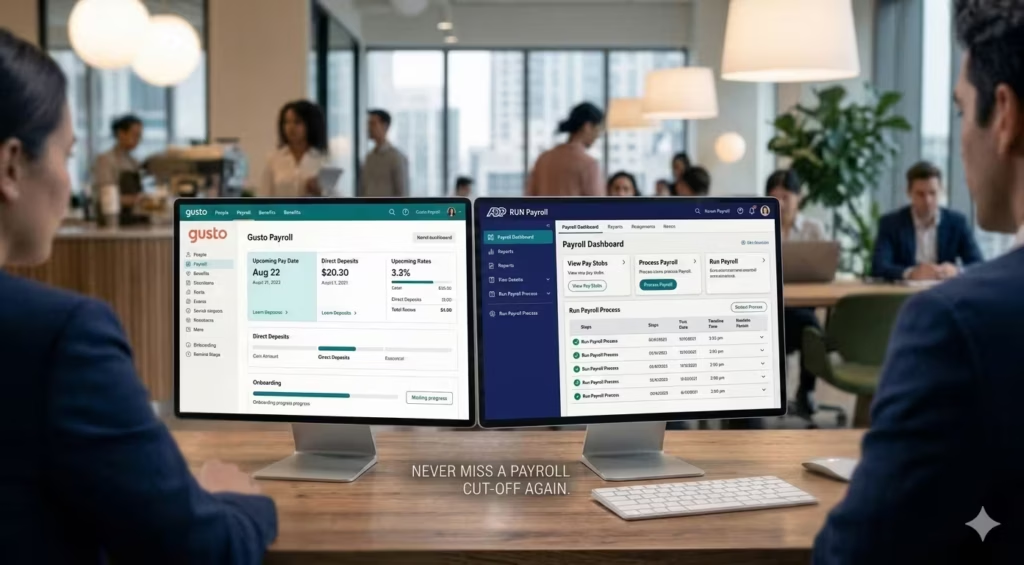
You can’t decide if it is worth it without looking at the alternatives. Let’s do a QuickBooks payroll vs Gusto comparison and look at ADP.
Gusto
Gusto is the darling of the modern payroll world.
- Pros: Better user interface, often cheaper for small teams, excellent international contractor support.
- Cons: Integration with QuickBooks is good but not native/perfect.
- Verdict: If you don’t use QuickBooks for accounting, use Gusto. If you do, it’s a toss-up. Is QuickBooks payroll good for small business compared to Gusto? Gusto feels friendlier; QuickBooks feels more “accounting-focused.”
ADP
The corporate giant.
- Pros: Can scale to thousands of employees. Great for complex benefits.
- Cons: Clunky interface, opaque pricing, often overkill for small biz.
- Verdict: Only go ADP if you plan to grow into a mid-sized enterprise quickly.
FreshBooks
- Pros: Great for freelancers and very small service businesses.
- Cons: Not a full-blown payroll powerhouse like Intuit.
- Verdict: Good for invoicing, less robust for complex payroll needs.
Feature Comparison Table
| Feature | QuickBooks Payroll | Gusto | ADP Run |
| Native QBO Integration | ⭐⭐⭐⭐⭐ (Perfect) | ⭐⭐⭐ (Good) | ⭐⭐⭐ (Okay) |
| Ease of Use | ⭐⭐⭐⭐ | ⭐⭐⭐⭐⭐ | ⭐⭐⭐ |
| Pricing Transparency | ⭐⭐⭐ | ⭐⭐⭐⭐⭐ | ⭐⭐ |
| Tax Penalty Protection | Yes (Elite only) | No | Yes (Some plans) |
| Same Day Pay | Yes | Yes (Wallet) | No |
Is QuickBooks Payroll Worth the Cost?
We have looked at the QuickBooks payroll features, the pricing, and the rivals. Now, let’s answer the core question of this QuickBooks payroll review: Is it worth it?
If you’re an existing QuickBooks Online user with 1–50 employees, QB Payroll Premium is the clear pick. And if you’re still in the process of setting up your QuickBooks account before adding payroll, our complete QuickBooks setup guide for small business covers the exact configuration steps.
I’ll break this down by who you are, because “value” is subjective.
For Startups (1–5 Employees)
If you already use QuickBooks Online, yes. The convenience of having everything in one login outweighs the slightly higher cost. The Core plan is sufficient here. The time you save on data entry justifies the QuickBooks payroll cost.
For Growing Teams (5–20 Employees)
Maybe. You need to weigh the QuickBooks payroll pricing against Gusto. If you need the HR features of the Premium/Elite plans, compare them carefully. The “per employee” cost starts to hurt here. However, the same day direct deposit might be the killer feature that keeps you here.
For Accountants
Absolutely. QuickBooks payroll for accountants is a dream. You can manage all your clients from one dashboard. The efficiency gains for a bookkeeping firm are massive.
For Freelancers
Probably not. If it is just you, this is overkill. You might be better off with a cheaper, simpler solution or just a basic invoicing tool that sets aside taxes.
People Also Ask – PAA’s
Is QuickBooks payroll good for small business?
Generally, yes. It provides a robust, reliable engine for automated payroll processing and payroll tax filing.
Does QuickBooks Payroll have hidden fees?
QuickBooks payroll hidden fees usually come in the form of extra charges for filing in multiple states or 401(k) administration fees. Always read the fine print on the add-ons.
What is the difference between QuickBooks Payroll Elite vs Premium?
The main difference is the Tax Penalty Protection. Elite covers penalties even if you make the mistake. Premium only covers them if Intuit makes the mistake. Elite also includes 24/7 support.
Can I do my own payroll taxes with QuickBooks?
You don’t have to! The system handles payroll tax compliance for you. It automatically calculates and files federal and state taxes.
How much does QuickBooks payroll cost per month for 1 employee?
On the Core plan, you are looking at roughly $45 base + $6 for the employee = $51/month (excluding the accounting software cost).
Who Should Avoid QuickBooks Payroll?
This QuickBooks payroll review wouldn’t be complete without telling you who should run away.
- Budget-Restricted Businesses: If every dollar counts, there are cheaper options. The convenience tax here is real.
- International Payroll Needs: If half your team is in Europe or Asia, QuickBooks struggles. It’s very US-centric. You’ll need a different tool for global employee payroll management.
- Complex Enterprise HR Requirements: If you need complex vesting schedules, intricate benefits administration, and robust HRIS features, you have outgrown this. You need a dedicated HR platform like Rippling or ADP.
Final Verdict
We have reached the end of this QuickBooks payroll review 2026.
Rating: 4.3/5
Best For: Small business owners who already live inside the QuickBooks ecosystem and value convenience over rock-bottom pricing.
Is it worth the cost? If you value your time more than $20/month, then yes. The seamless integration with your accounting software prevents headaches that are worth far more than the price difference between this and a budget competitor. The peace of mind regarding payroll tax compliance—especially with the Elite plan’s protection—is excellent.
However, if you are looking for the absolute friendliest UI or the lowest price, you might want to peek at Gusto. But for pure, integrated financial management, QuickBooks is still the king of the hill.
Ready to stop stressing about payroll? If you want to streamline your back office, check out the QuickBooks payroll plans today. Most offer a free trial or a discount for the first few months. Take it for a spin, run a mock payroll, and see if it saves you the hours I think it will.
Disclaimer: Pricing and features mentioned in this QuickBooks payroll review are based on 2026 data and are subject to change. Always check the official site for the latest QuickBooks payroll pricing.